
Platform Vendor / POS Vendor
Please use the following information to interface with the test environment.
Merchant ID
- Platform ID:3085672
System Integration Information
- Payment
- HashKey:3wIdviQWQMLPUQgL
- HashIV:IA7t8cbi8UbtTYqk
- ECTicket
- HashKey:b15bd8514fed472c
- HashIV:9c8458263def47cd
Merchant Information
If you are a merchant, you may omit the PlatformID parameter. When testing the API integration, please use the MerchantID provided below, along with the corresponding HashKey and HashIV for encryption, decryption, and generating the checksum (CheckMacValue).
Merchant ID
- Merchant ID:3085676
System Integration Information
- Payment
- HashKey:p2aDaZxWSZfx3weI
- HashIV:GukfyCOrgSc39ok6
- ECTicket
- HashKey:7b53896b742849d3
- 串接金鑰HashIV:37a0ad3c6ffa428b
Vendor's Management System (Stage)
The Vendor’s Management System allows merchants to view ECPay payment and ECTicket order information, manage product information, and perform ticket redemption and refund operations.
The login information for the testing environment is provided below:
- https://vendor-stage.ecpay.com.tw
- Acount ID:ecttcsstage02
- Unified Business Number:53538851
- Password:Aa123456
Test Information
The ticket must be listed before it can be officially issued.In the STAGE environment, we provide platform merchants with the option to use the pre-established product data of ECPay for API testing. When integrating the API in the STAGE environment, please use the corresponding merchant ID provided for testing purposes.
Product 1
- Ticket type:Pickup Voucher
- Item number:VQT04959
- Item name:GW STAGE Test-Double Occupancy Room Voucher
- Face value:1000
Product 2
- Ticket type:Pickup Voucher
- Item number:VNS21400
- Item name:GW STAGE Test-Food Voucher
- Face value:100
Product 3
- Ticket type:Gift Voucher
- Item number:CTT46366
- Item name:GW STAGE Test-Dessert Redemption Voucher
- Face value:0
Special Note:
- Please do not use the test information in the production environment because it may not interface correctly.
- When switching to the production environment (real/live mode), please replace them with real ones that you apply to ECPay.Please refer to Get production environment information.
- The HashKey and HashIV used for payment and ticket services are different. Please use the corresponding interface information for integration.
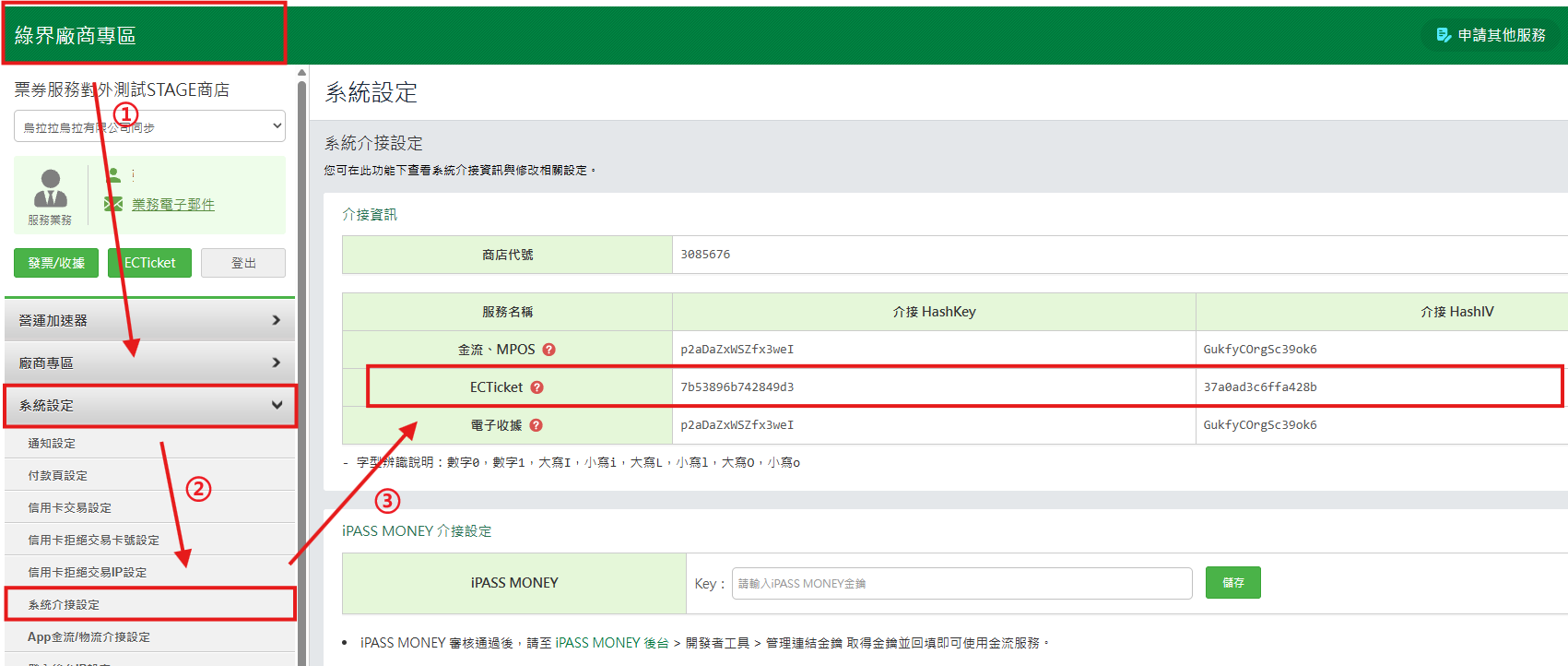
Production Integration Information
Please log in to the Vendor’s Management System to obtain the following information.
Navigation Path: System Settings → System Integration Settings → Integration Information
Merchant Information:
- Merchant ID
- HashKey
- HashIV